Best LinkedIn inbox management tools in 2026
By HippoBox Team · 4 June 2026 · 10 min read
Your LinkedIn inbox is not just a messaging app. For salespeople, recruiters, consultants, and founders, it is often the front door of the business. Deals start there. Candidates respond there. Partnerships get built there.
LinkedIn's native inbox was not designed for that kind of work. There is no proper labelling system, no snooze workflow, no simple way to separate hot leads from cold pitches, and no native reminder system for follow-ups that matter.
Quick answer
For professionals managing LinkedIn DMs as a revenue pipeline, HippoBox is the strongest all-round option. For inbox-only organisation, Kondo is a focused choice. For enterprise sales teams already using Salesforce, LinkedIn Sales Navigator is worth considering.
What to look for in a LinkedIn inbox tool
The best LinkedIn inbox tools do more than make the interface look cleaner. They help you process conversations, remember follow-ups, and keep relationship context visible.
- Labels and filtering: Categorise conversations and view them by context.
- Reminders and snooze: Make sure follow-ups do not fall through the cracks.
- Snippets: Reuse message templates without leaving the conversation.
- Keyboard shortcuts: Move quickly when you process dozens of conversations.
- Pipeline view: Treat important DMs as relationships at different stages.
- Account safety: Avoid tools that automate outreach in ways that risk your account.
1. HippoBox - best for sales, recruiting, and consulting
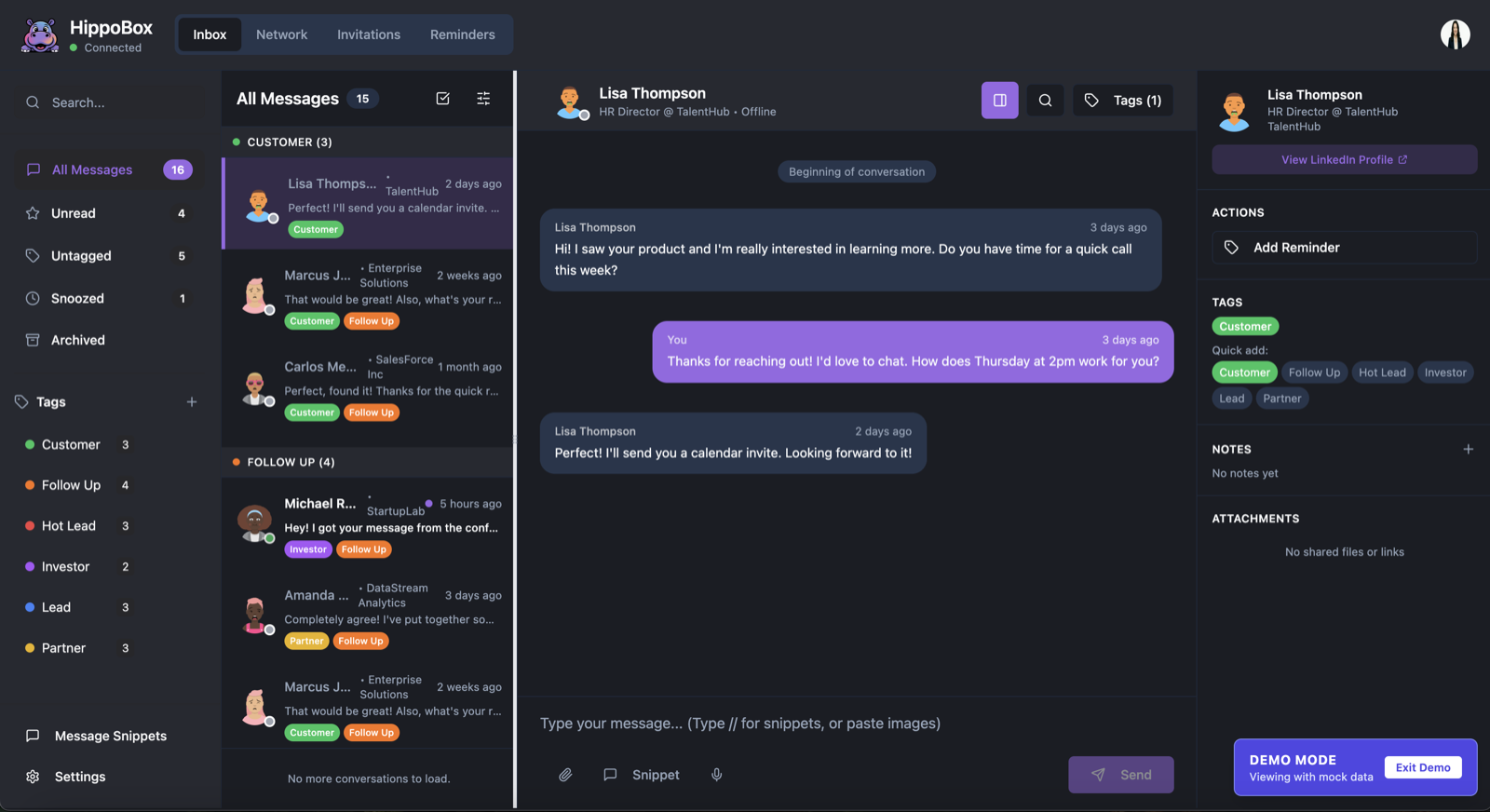
HippoBox is a LinkedIn inbox management tool built for people whose DMs directly generate revenue. Instead of only tidying your inbox, it turns conversations into an organised workflow with tags, reminders, snippets, keyboard navigation, recent connection views, and previous-contact signals.
It works especially well when LinkedIn is where opportunities begin. Salespeople can track prospects, recruiters can keep candidates moving, consultants can follow up on warm leads, and founders can stop losing investor or partnership conversations in the noise.
Standout HippoBox features
- Pipeline-style views for active LinkedIn DM opportunities.
- AI-generated tags to reduce manual labelling.
//snippet shortcut for reusable replies.- Voice notes from desktop without switching to your phone.
- J/K keyboard navigation for high-volume inbox processing.
- Bulk connection management for pending requests.
- Follow-up reminders on individual conversations.
HippoBox enhances your manual workflow rather than automating message sending. LinkedIn message content is stored locally in your browser; HippoBox servers sync account data, tags, reminders, snippets, and message IDs, but not the content of your LinkedIn conversations.
2. Kondo - best for inbox organisation
Kondo is one of the most established LinkedIn inbox organisers. Its focus is speed: labels, keyboard shortcuts, snooze, and a cleaner interface for people who want a better version of inbox zero.
Its strength is focus. Its limitation is that it does not give you a full pipeline view, AI tagging, or bulk connection tools. If you need only a faster inbox, Kondo is a solid choice. If your LinkedIn DMs are tied to revenue, you may want something with more relationship context.
3. LinkedIn Sales Navigator - best for enterprise teams
Sales Navigator is LinkedIn's own premium sales product. It adds advanced search filters, lead saving, InMail credits, and CRM sync for teams already using systems like Salesforce or HubSpot.
The trade-off is cost and workflow. You get LinkedIn's data layer and CRM integrations, but the inbox experience still feels like LinkedIn's native inbox with more information attached.
4. Folk CRM - best for lightweight relationship management
Folk is not a dedicated LinkedIn inbox overlay. It is a lightweight relationship management tool that helps you organise people across channels. That makes it useful for consultants, investors, and connectors who manage relationships beyond LinkedIn alone.
The downside is context switching. Conversations still happen in LinkedIn, while relationship management happens in Folk.
5. HubSpot CRM - best for post-DM deal tracking
HubSpot is not a LinkedIn inbox manager, but many teams use it after a LinkedIn conversation becomes a qualified opportunity. The free CRM is genuinely useful for deal tracking, but moving context from LinkedIn to HubSpot usually takes manual work or integrations.
6. Clay - best for high-volume prospecting
Clay is more of a pre-inbox tool than an inbox management tool. It helps with prospecting, data enrichment, and prioritising outreach lists. You use Clay to decide who to contact, then LinkedIn or a messaging workflow to continue the conversation.
Quick comparison table
| Tool | Best for | LinkedIn-native? |
|---|---|---|
| HippoBox | Pipeline and inbox management | Yes - Chrome extension |
| Kondo | Inbox organisation | Yes - Chrome extension |
| LinkedIn Sales Navigator | Enterprise sales and CRM sync | Native LinkedIn product |
| Folk CRM | Multi-channel relationships | Partial import workflow |
| HubSpot CRM | Post-DM sales pipeline | No - manual or integration-led |
| Clay | Prospecting and enrichment | No - pre-outreach workflow |
Which tool should you choose?
If you are drowning in DMs and losing track of follow-ups, start with HippoBox. If you want only a cleaner, faster inbox without pipeline features, Kondo is a focused choice. If you are running enterprise sales with Salesforce already in place, Sales Navigator may make sense.
The main thing to avoid is outreach automation that auto-sends connection requests or messages at scale. Tools that organise and enhance your manual workflow are a safer long-term bet.
Try HippoBox for your LinkedIn inbox
HippoBox helps you manage LinkedIn DMs with tags, reminders, snippets, keyboard shortcuts, and pipeline context without reading or storing your message content on HippoBox servers.
Start Free TrialRelated: Best Kondo Alternatives in 2026 · HippoBox vs Native LinkedIn Inbox · How to Follow Up on LinkedIn