Privacy-first LinkedIn inbox manager

A faster way to manage your LinkedIninbox.

HippoBox is a LinkedIn inbox management tool for founders, recruiters, creators, and sales teams who need tags, reminders, snippets, keyboard shortcuts, and follow-up workflows without turning their DMs into a spreadsheet.

Start your 14-day free trial without a credit card. HippoBox keeps message content local in your browser while syncing only the account data, tags, reminders, and message IDs needed to run the app.

14 days free. No credit card required.

Process your LinkedIn DMs without losing the thread

Quick Tag
Marcus Johnson
Account Executive @ Enterprise Solutions
1
Customer
2
Follow Up
3
Hot Lead
4
Investor
5
Lead
6
Partner
↑↓ Navigate • Enter Toggle • 1-9 Quick select • Esc Close
Quick Tag
Sarah Miller
VP Engineering
1
Customer
2
Follow Up
3
Hot Lead
4
Investor
5
Lead
6
Partner
↑↓ Navigate • Enter Toggle • 1-9 Quick select • Esc Close
Quick Tag
Alex Chen
Founder @ Stealth
1
Customer
2
Follow Up
3
Hot Lead
4
Investor
5
Lead
6
Partner
↑↓ Navigate • Enter Toggle • 1-9 Quick select • Esc Close
REAL WORKSPACE

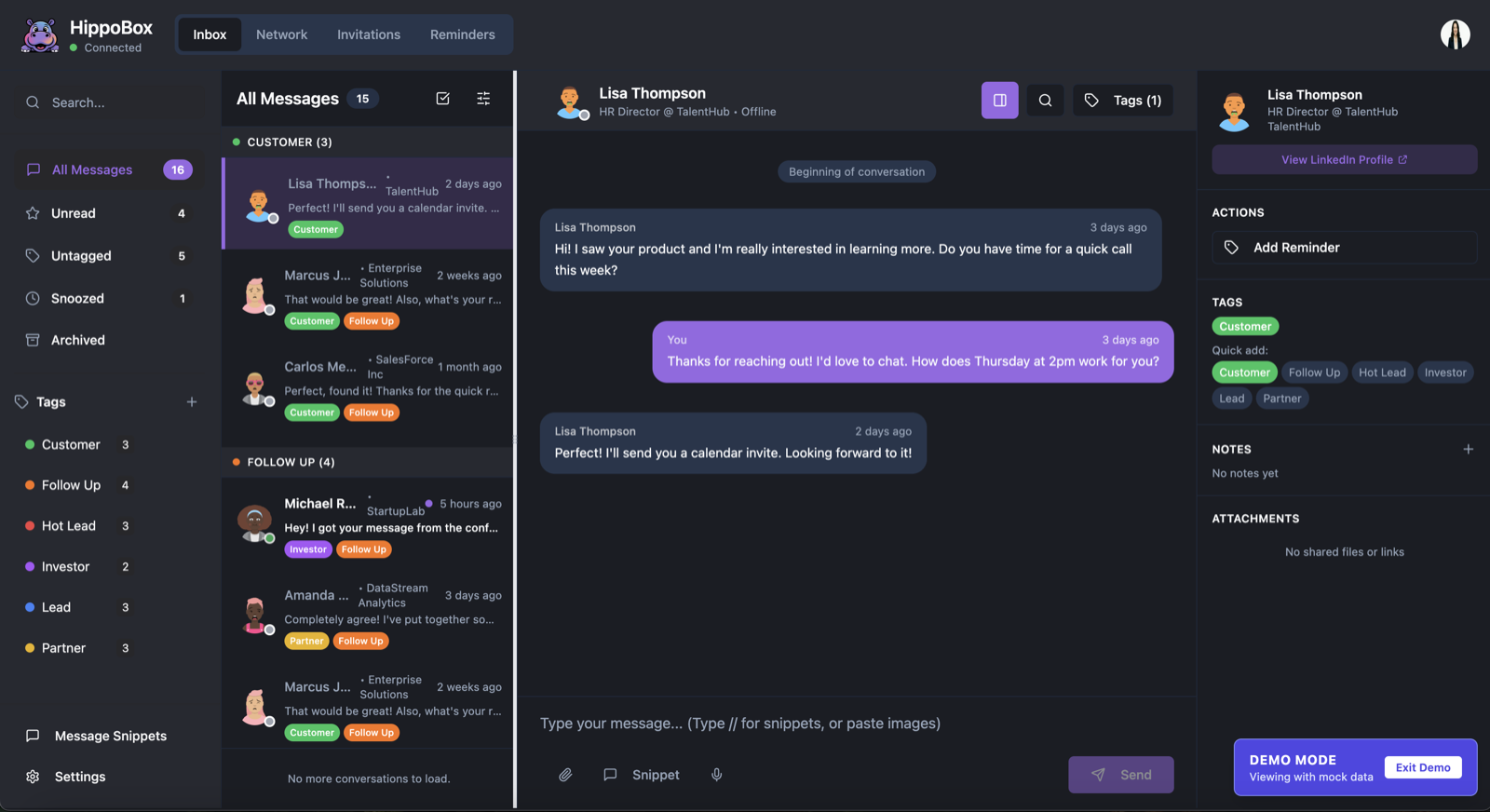
See the LinkedIn inbox workflow HippoBox is built for

HippoBox brings conversations, tags, reminders, snippets, and network context into one focused command centre for LinkedIn inbox management.

Actual HippoBox inbox interface with message list, active conversation, tags, reminders, snippets, and contact sidebar
Actual HippoBox inbox interface showing message lists, tags, reminders, snippets, and conversation context.
SNIPPET REPLIES

Reply faster without sounding robotic

Use HippoBox as a LinkedIn DM organiser for repeated replies, pricing answers, calendar links, and follow-ups. Hit // and select your snippet.

  • ✓ Personalise with Names/Companies
  • ✓ Trigger with double slash
  • ✓ Keep replies consistent across busy inboxes
Great connection. How about...
Hi //pi 
//pitch-intro
//pricing-faq
//calendar-link
FOLLOW-UP MANAGEMENT

Never forget who needs a reply

Set reminders on conversations that matter, separate hot leads from cold threads, and get closer to LinkedIn inbox zero without relying on memory.

Alex Chen
Follow up on pricing
🏷️ Hot Lead
Tomorrow
Sarah Miller
Check in about project
🏷️ Follow Up
Thursday
David Rose
Send case study
🏷️ Investor
Next Week
LINKEDIN CRM

Your network, actually organised

HippoBox works like a lightweight LinkedIn CRM: filter connections and followers, see recent contacts, tag relationships, and find the people who actually matter.

  • ✓ Custom tags by industry, role, and deal stage
  • ✓ Filter by "Followers" vs "Connections"
  • ✓ View recent connections and previously contacted people
  • ✓ Set custom reminders
All
Connections
PROFILE
HEADLINE
TAGS
ACTION
Sarah Jenkins
1st Connection
VP of Sales @ TechFlow | Scaling Teams
SaaS Recruiting
✉️
Mike Ross
Follower
Founder @ LegalZoom | Angel Investor
Founder Legal
✉️
Jessica Pearson
1st Connection
Managing Partner @ Pearson Specter
VIP
✉️

Built for fast LinkedIn inbox workflows

The everyday tools you need for organised LinkedIn DMs.

🎤

Voice Memos

Send voice notes directly from your LinkedIn conversation when a typed reply is not enough.

Keyboard Shortcuts

Move through messages, tags, and replies with keyboard-first controls built for inbox zero.

📨

Invitation Manager

Review new LinkedIn connections and invitations in one place so your network stays useful.

How It Works

From chaos to clarity in four steps.

1
Connect
Link your LinkedIn
2
Sync
Fetch active chats
3
Organize
Tag & prioritize
4
Reply
10x faster replies

What is HippoBox?

HippoBox is a privacy-first LinkedIn inbox management tool. It helps you organise LinkedIn messages, follow up with leads, manage connections and followers, save snippets, and work toward inbox zero from a cleaner command centre than the native LinkedIn inbox.

Message content stays in your browser's local storage. Our servers are designed for account access, billing, tags, reminders, snippets, and sync metadata - not reading or storing your LinkedIn conversation content.

Built for people who live in LinkedIn DMs, but do not want their inbox living in their head.

Simple, Transparent Pricing

Start with 14 days free. No credit card required.

Monthly

No card needed to start

£14.99 /month
  • ✓ 14-Day Free Trial
  • ✓ No Credit Card Required
  • ✓ Unlimited Tags & Snippets
  • ✓ Fast Snippet Replies
  • ✓ Chrome Extension
  • ✓ Smart Search & Filters
  • ✓ Cancel Anytime
Start Free Trial
HOW IT COMPARES

HippoBox vs the native LinkedIn inbox

LinkedIn is built for browsing. HippoBox is built for processing messages, managing relationships, and remembering who needs the next reply.

Native LinkedIn

  • Messages mixed with distractions and feed behaviour
  • No practical custom tagging system for DMs
  • Weak follow-up reminders for relationship workflows
  • Hard to separate new connections, followers, and old conversations

HippoBox

  • Focused LinkedIn inbox zero workflow
  • Custom tags, snippets, keyboard shortcuts, and reminders
  • Network view for recent connections and previously contacted people
  • Message content stored locally in your browser

Why Hippo? 🦛

We didn't build HippoBox to be another automation tool. We built it because we were tired of losing great opportunities inside LinkedIn's native inbox.

We realized that while we were out living our lives, our LinkedIn inboxes were becoming graveyards of forgotten conversations. We missed messages from potential partners, forgot to reply to recruiters, and lost track of friends.

We wanted a tool that felt less like a spreadsheet and more like a focused workspace: tags, reminders, snippets, recent connections, and fast replies, without storing your message content on our servers.

That's HippoBox.

Frequently Asked Questions

Everything you need to know

How does the auto-sync work?
HippoBox uses a Chrome extension to process your LinkedIn inbox in your browser. When you receive a LinkedIn message, it can appear in HippoBox. When you reply in HippoBox, the extension sends that reply through LinkedIn.
Is this safe for my LinkedIn account?
HippoBox is designed for manual inbox management, not spam automation. It helps you organise, search, tag, and reply to messages you already have access to in LinkedIn.
Does it work on mobile?
Currently, HippoBox is optimized for desktop use. We're working on mobile support, but for now, you'll get the best experience on your laptop or desktop computer.
What happens to my data?
Your LinkedIn message content is stored locally in your browser. Our servers store account details, billing state, tags, reminders, snippets, and message IDs needed for sync, but not the content of your LinkedIn conversations. We do not sell your data.
Who is HippoBox for?
HippoBox is for anyone who treats LinkedIn DMs as a work inbox: founders, recruiters, creators, consultants, agency owners, and sales teams who need a lightweight LinkedIn CRM, DM organiser, and follow-up management tool.
Where is HippoBox based?
HippoBox is built in London. We design the product with UK and European privacy expectations in mind: LinkedIn message content stays local in your browser, and our servers avoid storing the content of your conversations.